Every LTO drive from LTO-4 onward encrypts in hardware with AES-256, whichever brand is on the front, so the drive is not what separates one tape system from another. What differs is how the encryption keys are managed: by the backup software, by the tape library through an external key manager, or by the host's tape driver. Add WORM cartridges and a copy that is offline when ejected, and tape covers the threats disk and cloud copies struggle with.
What every current LTO drive has
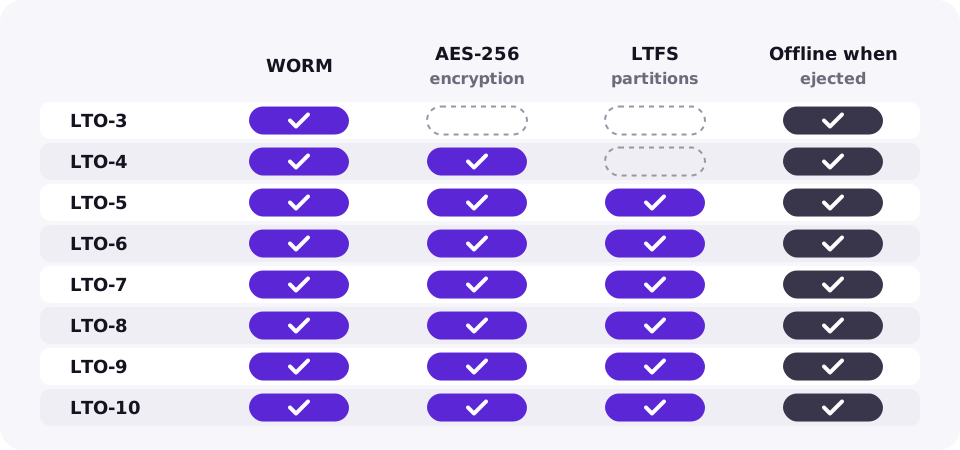
Encryption, write-once media and the LTFS file system arrived in different generations and are part of the LTO standard, so they behave the same on HPE, IBM, Quantum and Dell drives of the same generation.
| Feature | Since | What it protects against |
|---|---|---|
| WORM cartridges | LTO-3 | Overwriting or deleting data, including by ransomware or an insider |
| AES-256 hardware encryption | LTO-4 | Reading a lost or stolen cartridge |
| LTFS partitions | LTO-5 | Lock-in: the tape stays readable without the original backup software |
| Offline when ejected | All generations | Anything that travels over the network |
The three ways to manage keys, compared
| Method | Where the key lives | Good for | Watch out for |
|---|---|---|---|
| Application-managed | The backup software's database | One backup product, simple setups | Keys are tied to that software. Back up its key store, or a lost database means unreadable tapes |
| Library-managed | An external key manager the library reaches over KMIP | Several applications sharing a library, audits and compliance | Needs a key manager that is always reachable; on some library models it is a licensed feature |
| System-managed | A key manager reached by the host's tape device driver | IBM environments | Mostly limited to IBM drivers and platforms |
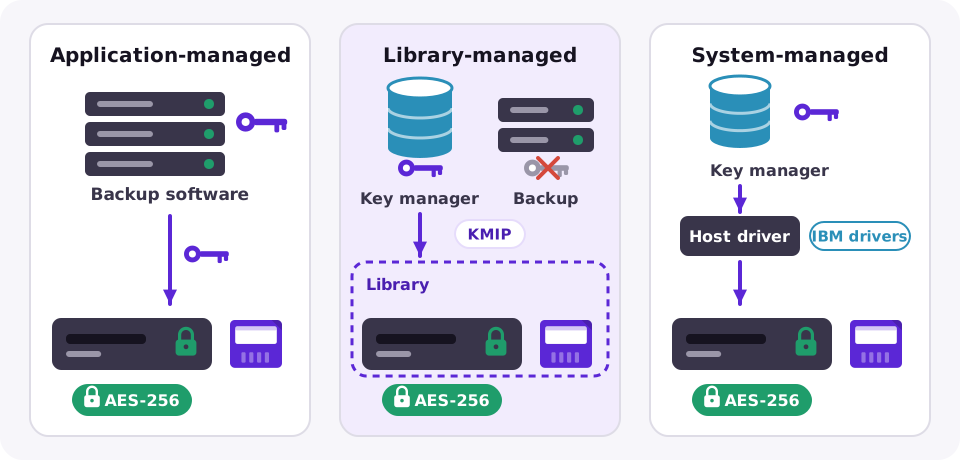
Whichever method you choose, the rule is the same: an encrypted cartridge without its key cannot be read, by you or anyone else. Keep the keys in at least two places, separate from the tapes.
Tape, disk and cloud security side by side
| LTO tape | Disk backup | Cloud object storage | |
|---|---|---|---|
| Offline copy | Yes, once ejected | No, always online | No, reachable with credentials |
| Immutability | WORM cartridges | Immutable snapshots or hardened repositories, depending on product | Object Lock in compliance mode |
| Encryption at rest | AES-256 in the drive | Depends on array or software | On by default at major providers |
| Reachable by ransomware | Only while mounted | Yes, over the network | Through stolen credentials or API keys |
The strongest setups combine them: recent backups on disk for speed, and an encrypted tape copy that leaves the building. See why offsite tape still wins and our tape, disk and cloud comparison.
Frequently asked questions
Does tape encryption reduce capacity or speed?
Not noticeably. The drive compresses data first and then encrypts it in hardware, so native and compressed capacity stay the same.
Which LTO generations support hardware encryption?
LTO-4 and every generation since, including LTO-9 and LTO-10, with AES-256.
Is WORM the same as encryption?
No. WORM stops data from being changed or deleted; encryption stops it from being read without the key. For ransomware protection you usually want both.
What happens if I lose the encryption key?
The data on that cartridge cannot be recovered. Store keys in a key manager or in your backup software's protected key store, with a copy kept away from the tapes.