How do I read an old LTO tape?
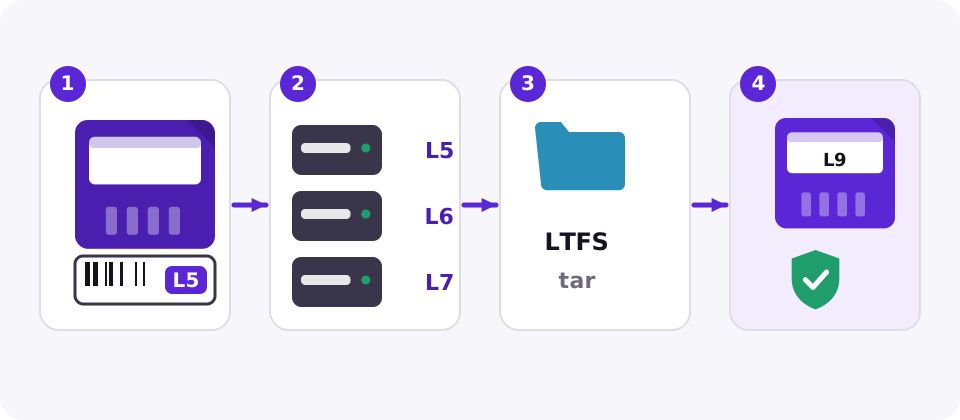
Find a drive of the same generation or one or two generations newer (see the table), connect it with a SAS HBA, and read the tape with the software that wrote it, or with an LTFS tool if it was written with LTFS.
Recovery guide
To recover data from an old LTO tape, find a drive that reads its generation (LTO-8 and newer read only one generation back), then read it with the software that wrote it or an LTFS tool; encrypted tapes need their key, and physically damaged tapes belong in a lab.
Step 1
The generation is printed on the cartridge and in the last two characters of the barcode label (L5 for LTO-5, L6 for LTO-6 and so on). Then find a drive that reads it:
| Cartridge | Native capacity | Drives that read it |
|---|---|---|
| LTO-2 | 200 GB | LTO-2, LTO-3, LTO-4 |
| LTO-3 | 400 GB | LTO-3, LTO-4, LTO-5 |
| LTO-4 | 800 GB | LTO-4, LTO-5, LTO-6 |
| LTO-5 | 1.5 TB | LTO-5, LTO-6, LTO-7 |
| LTO-6 | 2.5 TB | LTO-6, LTO-7 |
| LTO-7 | 6 TB | LTO-7, LTO-8 |
| LTO-8 | 12 TB | LTO-8, LTO-9 |
| LTO-9 | 18 TB | LTO-9 |
| LTO-10 | 30 TB or 40 TB | LTO-10 |
LTO-2 to LTO-5 drives are now only sold used. Buy from a seller who states head hours and offers returns, and test the drive with a cartridge you do not need.
Step 2
A drive returns raw blocks; the software that wrote them decides how you get files back.
The first blocks of the tape usually name the format; a recovery lab or the software vendor can tell you what wrote it.
Encryption
Drives from LTO-4 onward can encrypt with AES-256. If a tape was encrypted by the drive or the backup software, it cannot be read without the key, and no lab can recover it without one. Look for the key in the backup software, the library's key manager or your key management server before anything else.
Damaged tapes
Stop retrying and send the cartridge to a data recovery lab if the tape is snapped, creased or wet, the leader pin is detached, the cartridge rattles or was dropped, or the drive reports a medium error repeatedly. Every extra attempt in a drive can stretch the tape or damage the head. Labs can splice tape, replace the cartridge shell and read past bad sections, and they charge by the cartridge and the work involved, so ask for a quote and a no-recovery, no-fee policy.
Then migrate
Once the data is back, copy it to current media and verify it, so you are not in the same position again in five years. See LTO tape migration.
More guides
Pricebook
Request current LTO media and drive pricing before you budget a migration or a refresh.
Find a drive of the same generation or one or two generations newer (see the table), connect it with a SAS HBA, and read the tape with the software that wrote it, or with an LTFS tool if it was written with LTFS.
No. LTO-8 drives read only LTO-7 and LTO-8. An LTO-6 tape needs an LTO-6 or LTO-7 drive.
Install the same or a newer version of that product and rebuild its catalogue from the tape. A recovery lab can also read most backup formats.
No. LTO drive encryption uses AES-256, and without the key the data cannot be read.
Often, by a lab: snapped or damaged tape can be spliced and the cartridge shell replaced. Stop using it in a drive as soon as you see physical damage.