The tape systems that integrate best are the ones on your backup software's compatibility list. Current LTO drives and libraries from HPE, IBM, Quantum and Dell work with Veeam, Commvault and the other mainstream products when the exact model, firmware and host adapter are listed. The real tradeoffs sit in the software: built-in automation and a searchable catalogue against being able to read the tapes without that software.
How common backup software works with tape
| Software | Tape support | Tape format | Best for | Tradeoff |
|---|---|---|---|---|
| Veeam Backup & Replication | Libraries and standalone drives; backup-to-tape and file-to-tape jobs with GFS retention | Veeam's own | Mostly virtual estates (VMware, Hyper-V) | Tape is a second copy of disk backups; restores go through Veeam |
| Commvault | Libraries across a very wide range of platforms and workloads | Commvault's own | Large mixed physical, virtual and cloud estates | Cost and complexity |
| Nakivo | Tape libraries, autoloaders and standalone drives | Nakivo's own | Small and mid-size environments | Fewer enterprise features than the large suites |
| Bacula / Bareos | Libraries through an autochanger, standalone drives | Open source | Linux teams that run their own tooling | You build and maintain scheduling, catalogue and monitoring |
| LTFS tools | Single drives, and libraries with some tools | LTFS, an open standard | Media archives, data exchange | No catalogue across cartridges and no scheduling |
The tradeoffs that matter
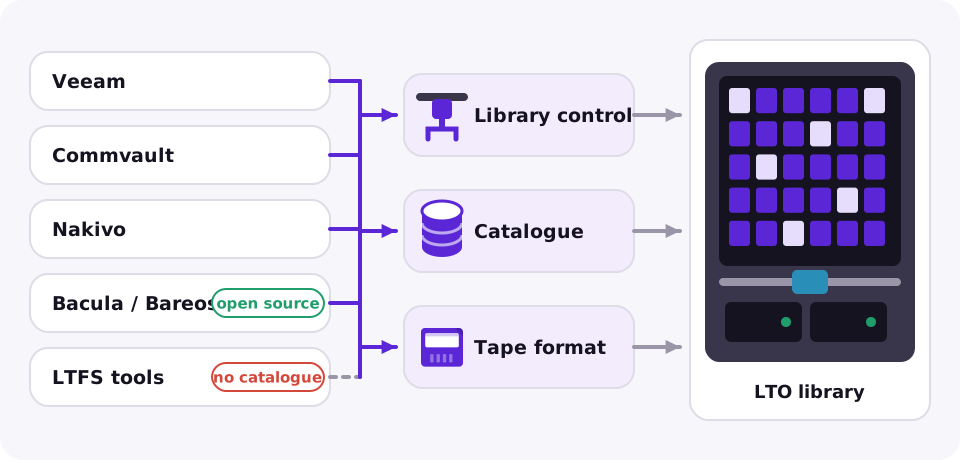
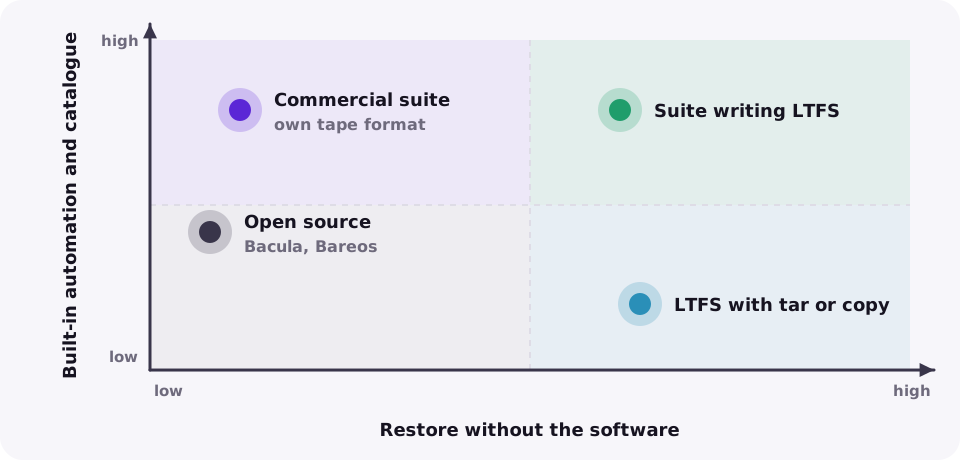
Format. Most suites write their own tape format, so you need that software, or its recovery tools, to restore. LTFS keeps the files readable on any LTFS system, which matters for archives kept for decades. Some backup and archive products can write LTFS as an option.
Catalogue. A suite's catalogue finds one file across hundreds of cartridges in seconds. Without it you are searching tape by tape. Back up the catalogue itself, ideally to the same tapes.
Library control. Barcode inventory, mail slots for offsite tapes, cleaning and partitioning are handled by the software. Check that your library model, not only the drive, is supported.
Encryption keys. If the software manages the keys, losing its database means losing access to encrypted tapes. See tape encryption and security compared.
Integration checklist
| Check | Why |
|---|---|
| Drive and library on the compatibility list | Model, firmware and host adapter must all be listed for support to apply |
| Interface | SAS for one host; Fibre Channel to share a library across a SAN |
| Format option | LTFS output if tapes must outlive the software |
| Catalogue backup | A restore without the catalogue means rescanning every cartridge |
| Licensing model | Per socket, per workload or per capacity changes the cost as the archive grows |
Get a shortlist for your environment from the tape backup software finder, compare products in best tape backup software 2026, or read about the free route in the LTFS guide.
Frequently asked questions
Which tape drives work with Veeam and Commvault?
Current LTO drives and libraries from the major brands are supported when the exact model and firmware are on the product's compatibility list. Check the list before you buy.
Can I read my tapes without the backup software?
Only if they were written in LTFS or another open format. Most suites write their own format, so restores go through that software or its recovery tools.
Is LTFS enough on its own?
For a small media archive, often yes. It lacks a catalogue across cartridges, scheduling and retention rules, which backup software provides.
Do I need a library to automate tape backups?
Only when a backup spans more cartridges than fit in one drive. A single drive works for small archives if someone changes the tapes.